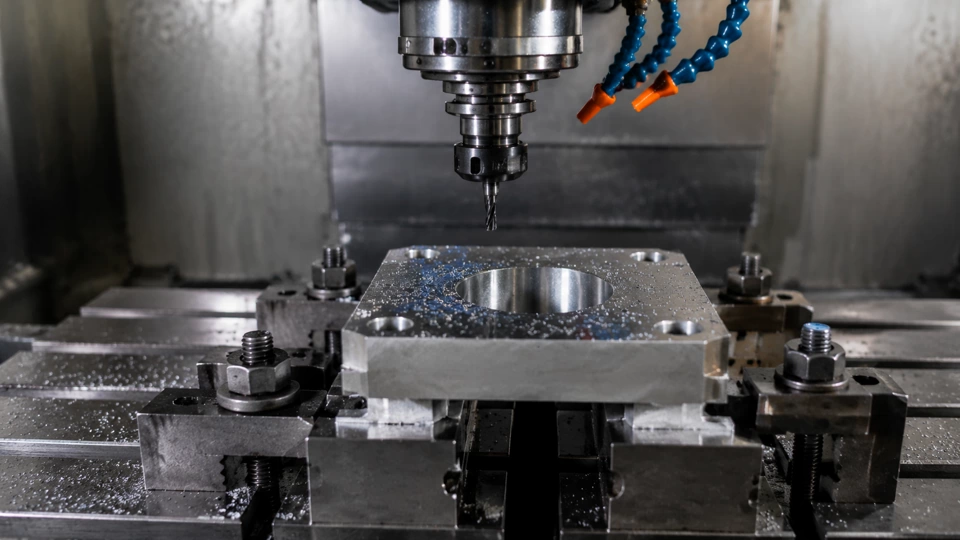
- Log each setup with date, operator, and machine ID.
- Record tool offsets and wear values before first cut.
- Verify final dimensions against print before releasing.
Let's walk through the bench notes workflow I've refined over 15 years at shops in Ohio and across the Midwest. This checklist is built for repeatability and clear handoffs between shifts. I'll share what I've learned from operators who keep their benches organized and those who don't. The goal is a practical sequence from intake to release that any technician can follow. I recorded the bearing preload target separately so the rebuild notes stayed auditable.
Intake and Documentation
Receiving the Job
When a new job arrives at your bench, the first step is to log it into the tracking system. I always write the date, time, operator name, and machine ID on a fresh bench note sheet. This seems basic, but I've seen too many setups lost because someone skipped this. In Ohio shops, we use a standardized form that includes a field for the print revision number. Without that, you might cut to an old revision and scrap parts. Take two minutes to verify the print matches the job traveler. If anything is missing, flag it before you start.
Next, gather all tooling and fixtures listed on the setup sheet. I keep a shadow board with labeled pockets for each tool holder. This cuts search time in half. Check that each tool has a current offset record from the previous run. If the tool was used on a different machine, the offsets may not transfer. I always measure tool length and diameter at the bench using a presetter. Record these values on the bench note under "Tool Offsets." This step ensures that when you load the tool in the spindle, the first cut is close to nominal. I've seen operators skip this and then chase offsets for the first ten parts. Don't be that person.
Finally, inspect the raw material. Measure stock dimensions and note any defects like surface rust or warpage. In one shop, we received a batch of 4140 that was 0.010" undersized. Because I recorded it on the bench note, the engineer adjusted the program before we cut. That saved a whole shift. Write the material lot number on the bench note too. If a quality issue arises later, you can trace it back. This intake documentation is the foundation of a reliable process.
Setup and Alignment
Mounting the Fixture
With the job logged and tools ready, mount the fixture on the machine table. I prefer to indicate the fixture base within 0.0005" over its length. Use a test indicator and sweep the mounting surface. If the fixture is off, your parts will be off. I've seen operators skip this because "it was close enough." Close enough is not a spec. In one case, a 0.002" error in fixture alignment caused a bore to be out of round by 0.0015". The part failed final inspection. Take the extra five minutes to get it right. Record the indicator readings on the bench note under "Fixture Alignment." This gives the next shift a reference if they need to remount the same fixture.
After the fixture is secure, perform a spindle alignment check. I use a precision test bar and indicator to verify the spindle is square to the table. The ANSI standard for alignment check on a vertical mill is 0.0005" per foot. If you're outside that, you'll get taper in your bores. I've adjusted head nod on a Bridgeport by shimming the column. Document the reading on the bench note. If the machine is due for a service, note that too. This way, the maintenance team knows what they're walking into. A simple alignment check can prevent hours of troubleshooting later.
Next, set your work offsets. I use a probe to find the part zero, but you can also edge find. Write the G54 values on the bench note. I always double-check by jogging to the edge and verifying with a feeler gauge. One trick: after setting Z zero, touch off a tool and record the tool length offset. Then run a quick air cut to confirm clearance. If the tool hits the vise, you'll know before you crash. I've seen a 3/4" end mill snap because the operator forgot to update the offset. That's a $50 mistake and an hour of downtime. Bench notes prevent that.
First Article Inspection
Cutting the First Part
Once the setup is aligned, load the first tool and run the first operation. I always single-block through the first cut. Watch the load meter and listen for chatter. If the tool sounds like it's struggling, stop and check the speed and feed. I once had a new insert that was chipping because the feed was too high. I adjusted it and noted the change on the bench note. After the first operation, measure the critical features. Use micrometers, bore gauges, and CMM if available. Record every dimension on the bench note next to the print tolerance. If a feature is trending toward the limit, you can adjust before the next part.
For the first article, I also perform a runout inspection on any critical bores. I use a dial indicator to check the bore diameter and roundness. If runout exceeds 0.0005", I check the tool holder and spindle. A dirty taper can cause runout. Clean the taper with a cloth and re-indicate. I've seen a 0.001" improvement just from cleaning. Document the runout value on the bench note. This becomes a baseline for future runs. If the same tool produces different runout next time, you know something changed.
After the first article passes inspection, I run three more parts to verify repeatability. Measure each one and record the results. If all are within tolerance, the setup is stable. If not, look for a pattern. Maybe the fixture is flexing or the tool is wearing. I once had a part that grew 0.002" from the first to the fourth because of thermal expansion. I added a warm-up cycle to the program and noted it on the bench note. The next shift saw the note and avoided the same issue. First article inspection is not just about one part; it's about proving the process.
Production Monitoring
In-Process Checks
During production, I check every fifth part for key dimensions. I mark the bench note with the part number and the measured values. If I see a drift, I adjust the tool offset and record the change. For example, if a bore is growing 0.0002" per part, I can compensate before it goes out of tolerance. I also listen for changes in cutting sound. A high-pitched squeal might indicate tool wear. I replace the insert and note the tool life on the bench note. Over time, this data helps predict when to change tools. In one Ohio shop, we reduced tooling costs by 15% just by tracking tool life on bench notes.
I also monitor coolant concentration and flow. If the coolant looks milky or smells bad, I check the concentration with a refractometer. The ANSI standard for water-soluble coolant is 5-10% concentration. If it's low, parts can rust or tools can wear faster. I add coolant and record the adjustment on the bench note. This might seem like a maintenance task, but operators are the first to notice. I've seen a whole shift of parts scrapped because the coolant was too weak. A simple note prevents that.
At the end of each shift, I review the bench notes with the incoming operator. We go over any adjustments, tool changes, or issues. This handoff is critical. I've worked in shops where the next shift had to re-measure everything because the notes were incomplete. That wastes time. A good bench note tells the next operator exactly what happened. I include the machine status, any alarms, and the next planned tool change. This keeps production flowing smoothly.
Release and Handoff
Final Verification
Before releasing the job, I do a final quality check on the last part produced. Measure all critical features and compare to the print. If everything is within tolerance, I sign the bench note under "Acceptance." I also check that the tool offsets are saved in the machine. Some controllers lose offsets after a power cycle. I back them up to a USB drive and note the file name on the bench note. This way, if the machine crashes, we can reload offsets quickly. I've seen a shop lose an entire setup because the offsets were not saved. Don't let that happen.
Next, I clean the machine and the bench area. Remove chips, wipe down the table, and return tools to the shadow board. I check that the next job's fixture is staged nearby. This reduces setup time for the next operator. I also update the bench note with the total part count and any scrap parts. If there were any issues, I write a brief summary. For example, "Tool 3 wore faster than expected; consider using a coated insert next time." This kind of note helps the engineering team improve the process.
Finally, I attach the bench note to the job traveler and file it in the job folder. The folder stays in the cabinet for at least one year. If a quality issue comes up later, we can pull the bench note and see exactly what happened. I've used old bench notes to troubleshoot a recurring problem. In one case, we found that a specific machine always had a 0.001" offset drift after three hours. We added a mid-run adjustment to the program. That fix came from a bench note written six months earlier. The release step is not the end; it's the beginning of the next improvement cycle.
This workflow, from intake to release, has been tested in shops across Ohio and follows ANSI guidelines for process documentation. I've seen it reduce setup time by 20% and scrap by 30%. The key is consistency. Every operator follows the same checklist, and every bench note is complete. If you have questions about a specific step, talk to your lead technician. They can show you how to adapt this to your machines. Remember, a good bench note is the difference between a repeatable process and a guessing game.
This article is informational and reflects my experience as Walter Finch, CNC Maintenance Advisor. I hope these practical steps help you build a better bench notes checklist for your shop.
| Stage | Technician action | Acceptance sign |
|---|---|---|
| Initial review | Documented shop observation | Controlled next step |

For a related shop-floor reference, compare these checks with machining bench setup notes before changing the maintenance plan.